
Published by CriptoCore · Information checked on
Which balance pays for each step?
| Step | What happens | Verified cost |
|---|---|---|
| Issuance | Creates the card; issuance alone doesn't add balance for purchases | US$ 1 per card |
| Top-up | Uses wallet balance to load the chosen card | 3% of the top-up amount |
| Purchase | The purchase amount comes from the card; the platform fee comes from the USDT wallet | US$ 0.10 per purchase, plus any issuer charges |
How to top up
- Check that your crypto deposit has already been credited to your wallet.
- Open Virtual cards and select the card you want to load.
- Choose top-up and enter the amount. Top-up limits remain defined in Brazilian reais by the issuer: R$ 5 to R$ 50,000 per operation. Amounts entered in dollars are converted at the displayed exchange rate; balance, account limits and approval rules also apply.
- Check the 3% fee, the total in reais and the corresponding USDT debit.
- Confirm and follow the processing. Only consider the amount available for purchases once it shows up in the card balance.
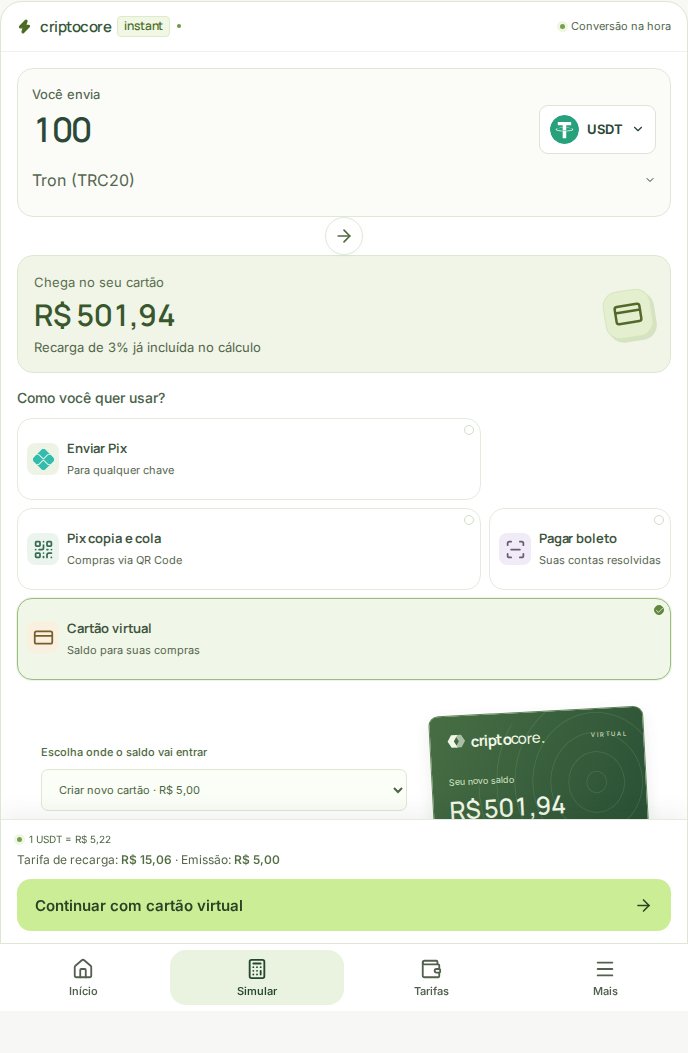
Example: how much does it cost to load US$ 100?
When you request a top-up of US$ 100, the 3% fee is US$ 3. The total is US$ 103 from your account balance, and the card receives the equivalent in reais at the rate shown at confirmation. If you also issue a new card in this operation, add the US$ 1 issuance fee: the total for both steps is US$ 104.
These amounts don't include an earlier deposit or costs from the source wallet. A later purchase has its own fee. If you start from the USDT amount in the simulator, it calculates the top-up amount that fits in that sum, already taking the displayed fees into account.
Using it for subscriptions and online purchases
Get the number, expiration date and CVV through the authenticated option to view card details. When you sign up for a subscription, watch the card balance for the next charge and keep balance in your wallet for the platform fees.
Approval depends on the issuer, the card network, the merchant, the balance and the card's status. There is no guarantee of acceptance by every store, subscription or advertising platform. Check the merchant's conditions before signing up.
Pending top-up or insufficient balance
A top-up that is still processing is not yet balance released for purchases. Check the selected card and the operation details before topping up again. Having USDT in your wallet doesn't mean the same amount has already been loaded onto the card.
If a purchase is declined, check the card balance, the wallet balance for the fee, the details entered and whether the card is frozen. A new top-up alone doesn't resolve a restriction from the issuer or the merchant.
Integrate this service into your system
Also available for developers: Virtual card API. Issue and top up virtual cards with your crypto balance through the CriptoCore API. See permissions, quotes, fees, lookups and tracking for each operation.
See the flows, permissions and examples in the CriptoCore API documentation.
Frequently asked questions
Does the issuance fee become purchase balance?
No. The US$ 1 issuance fee and the loaded balance are different amounts. To make purchases, the card needs a confirmed top-up.
Can I use the top-up to withdraw cash at a Banco24Horas ATM?
No. A top-up adds balance for purchases. Withdrawals at Banco24Horas ATMs through CriptoCore are in development.